Get the Available Network Connections Using WMI
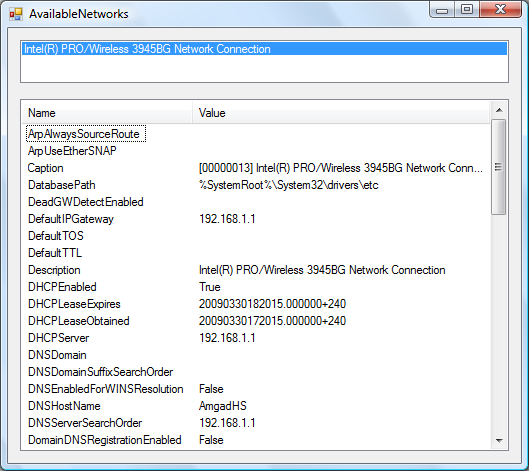
Windows Management Instrumentation (WMI) makes querying Windows for system and devices information easy. And this is even easier with System.Management assembly. The code listed loads the names of the network connections in a ListBox, which when clicked displays all the available properties in a ListView.
To get the code to work add a reference to System.Management. The form's Load event retrieves the list of network connections that use IP and loops through them adding each one's description property to the ListBox. The ListBox's SelectedIndexChanged event executes the same query again but adds to the WHERE clause the Description property. The result is the object selected by the user.
using System.Management;

public partial class MainForm : Form
{
	private void MainForm_Load(object sender, EventArgs e)
	{
		ManagementObjectSearcher query = new ManagementObjectSearcher(
			"SELECT * FROM Win32_NetworkAdapterConfiguration WHERE IPEnabled = 'TRUE'");
		ManagementObjectCollection queryCollection = query.Get();

		foreach (ManagementObject mo in queryCollection)
		{
			networksListBox.Items.Add(mo["Description"].ToString());
		}
	}

    private void networksListBox_SelectedIndexChanged(object sender, EventArgs e)
    {
        if (networksListBox.SelectedItem == null)
            return;

        ManagementObjectSearcher query = new ManagementObjectSearcher(
            "SELECT * FROM Win32_NetworkAdapterConfiguration WHERE IPEnabled = 'TRUE'" +
            " AND Description = '" + networksListBox.SelectedItem.ToString() + "'");
        ManagementObjectCollection queryCollection = query.Get();

        foreach (ManagementObject mo in queryCollection)
        {
            propertiesListView.Items.Clear();

            foreach (PropertyData property in mo.Properties)
            {
                ListViewItem prop = new ListViewItem(property.Name);

                if (property.Value != null)
                {
                    string val = "";

                    if (property.Value is string[])       //if property is a string array
                        foreach (string str in ((string[])property.Value))
                            val += str + " ";
                    else if (property.Value is Int16[])   //if property is an int16 array
                        foreach (Int16 num in ((Int16[])property.Value))
                            val += num.ToString() + " ";
                    else
                        val = property.Value.ToString();

                    prop.SubItems.Add(val);
                }

                propertiesListView.Items.Add(prop);
            }
        }
    }
}